Introduction
Smart displays have become useful additions to modern homes because they combine voice assistance with a visual screen. Instead of relying entirely on spoken responses, users can see information, follow visual instructions, check reminders, view compatible smart-home devices, and interact with content directly on a display.
The Amazon Echo Show 5 is designed around this combination of voice and screen interaction. Its compact format makes it suitable for locations where a larger smart display may not be practical, including bedside tables, kitchen counters, desks, shelves, and other smaller surfaces. The newest model is presented as a smart display designed for Alexa+, with improvements to sound intended to provide stronger bass and clearer audio.
For households already using Alexa-compatible devices, a small smart display can serve as a central point for everyday tasks. It can provide information through voice commands while also presenting visual content when appropriate. Depending on the services and devices connected to an account, it can also become part of a broader smart-home setup.
The Echo Show 5 is not simply a small screen. Its usefulness comes from combining several functions in one compact device: voice assistance, audio playback, visual information, compatible smart-home controls, reminders, timers, communication features, and other Alexa-supported functions.
Understanding how these capabilities fit into everyday routines is more useful than looking at the device purely as a piece of hardware. The right way to approach a smart display is to consider where it will be placed, what tasks it needs to handle, what other devices are already present, and how much screen space is actually necessary.
This guide explores the Amazon Echo Show 5 in those terms. It covers its main features, practical uses, potential advantages of a compact smart display, compatibility considerations, privacy and connectivity issues, and the differences between this type of device and broader categories such as smart speakers, larger smart displays, smartphones, and tablets.
What Is the Amazon Echo Show 5?
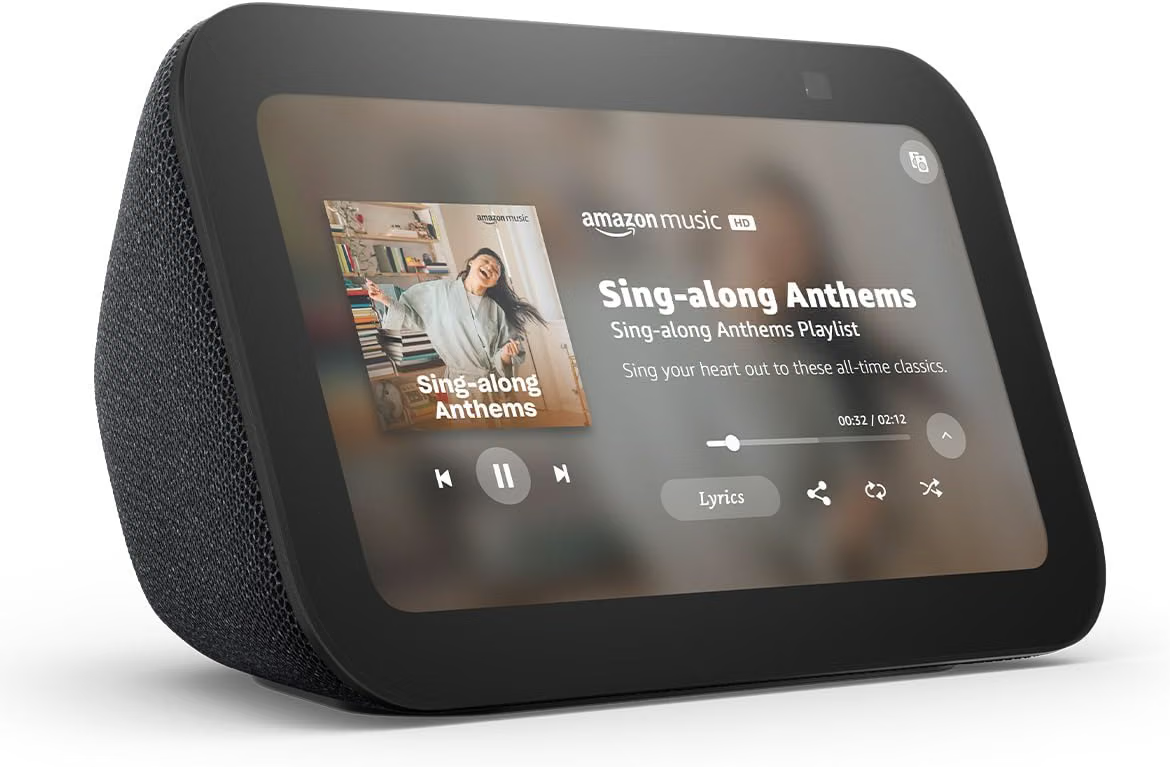
The Amazon Echo Show 5 is a compact smart display from Amazon’s Echo Show family. It combines a touchscreen with microphones and speakers, allowing users to interact with Alexa through both voice and visual controls.
The “5” in the product name reflects its small display class. Compared with larger Echo Show devices, its footprint is designed for spaces where desk or counter space is limited.
This compact design can be useful because many smart-home tasks do not require a large screen. Checking a timer, viewing a reminder, asking for information, controlling a compatible light, or listening to music can all be handled without needing a tablet-sized display.
At the same time, the screen adds capabilities that a conventional smart speaker cannot provide. Visual information can accompany spoken responses, and users can interact with certain functions by tapping the display.
The device is offered in Charcoal, providing a neutral appearance that can work with a variety of home-office, bedroom, kitchen, and living-space arrangements.
Key Features
Compact Smart Display
The most obvious characteristic of the Echo Show 5 is its compact smart-display format.
A smaller display can be particularly convenient on a nightstand or desk. Larger screens can provide more visual information, but they also require more physical space. The Echo Show 5 takes the opposite approach by focusing on essential information and interactions within a smaller footprint.
This makes placement an important part of the experience. Rather than treating the device like a television or large tablet, it can be thought of as an always-available household information point.
For example, it may sit beside a bed for alarms and reminders, on a kitchen counter for timers and recipes, or on a desk for quick voice-based assistance during work.
Alexa Voice Assistance
Alexa is central to the Echo Show 5’s functionality.
Users can issue voice commands instead of navigating through menus for every task. Depending on the functions and services available through the account, Alexa can handle questions, timers, alarms, reminders, music playback, compatible smart-home controls, and other supported activities.
Voice interaction can be especially convenient when the user’s hands are occupied. Someone preparing food, organizing a room, or working at a desk may find it easier to speak a command than stop what they are doing to use another device.
Alexa capabilities can also change over time as Amazon introduces software updates and new services. The availability of specific functions may depend on location, account settings, connected services, and device software.
Designed for Alexa+
The product is marketed as being designed for Alexa+, Amazon’s newer Alexa experience.
For users considering an Echo Show 5, this distinction is relevant because some newer Alexa capabilities may be designed around more natural interactions and greater use of contextual information.
However, it is important not to assume that every Alexa+ feature works identically in every location or account. Availability can depend on factors such as subscription status, supported services, software, and regional rollout.
The practical takeaway is that the device’s software experience is an important part of its functionality. The hardware is only one component of an Alexa smart display.
Touchscreen Interaction
Unlike a traditional Echo smart speaker, the Echo Show 5 has a screen.
This allows users to perform certain actions visually rather than relying exclusively on voice commands. Depending on the task, a user can tap controls, browse available information, view content, or interact with supported applications and features.
Touch interaction is also useful when silence is preferable. For example, someone working at a desk may choose to interact with the display rather than speaking aloud in a shared environment.
The touchscreen can therefore complement Alexa rather than replace it.
Improved Sound
The newest model is described as offering twice the bass and clearer sound compared with the previous generation.
Audio quality is relevant because the Echo Show 5 is not only a visual assistant. It can also function as a compact audio device for supported music, podcasts, alarms, notifications, and other content.
The compact enclosure naturally places physical limits on how much air a small speaker can move compared with larger dedicated audio systems. Nevertheless, improvements in speaker design can make a small smart display more useful for everyday listening.
Users should think of its audio capability according to the intended environment. A bedroom, office, kitchen, or small living area may have different acoustic requirements from a large room.
Smart-Home Control
The Echo Show 5 can act as a control point for compatible smart-home devices.
Depending on compatibility, users may be able to use Alexa to control lights, plugs, switches, thermostats, cameras, and other connected products.
The visual display can make certain smart-home interactions easier to understand. For example, compatible camera feeds can potentially be viewed on the screen instead of being accessed exclusively through a smartphone.
Smart-home compatibility should always be checked before purchasing or configuring a device. Not every smart-home product works with every ecosystem, and some features may require additional hardware, accounts, or services.
How the Echo Show 5 Can Be Used
On a Bedside Table
A compact smart display can fit naturally into a bedroom environment.
Users can use it for alarms, timers, reminders, music, weather information, and other supported Alexa functions. The screen can also display information without requiring the user to pick up a phone.
The small footprint is particularly relevant beside a bed, where available space may be limited.
At the same time, bedroom placement raises privacy considerations because the device includes microphones and, depending on the model’s configuration, camera-related functionality. Users should review privacy controls and choose settings that match their preferences.
In the Kitchen
The kitchen is another practical location for a small smart display.
Hands are often occupied while cooking, making voice interaction useful for setting timers, converting measurements, creating reminders, or requesting information.
The screen adds another dimension because information can sometimes be displayed rather than only spoken.
Placement matters here. The device should be positioned where it is easy to see without putting it unnecessarily close to water, steam, heat sources, grease, or areas where food could splash onto electronics.
On a Home-Office Desk
The Echo Show 5 can also serve as a small assistant in a home-office environment.
Users may use voice commands for reminders and timers while working. Audio playback can provide background listening, while the display can provide visual information when supported.
A desk placement also makes it easy to combine the Echo Show 5 with a computer. The computer remains the primary device for demanding work, while the smart display handles quick voice-oriented tasks.
This separation can reduce the need to constantly switch between applications for simple reminders or household controls.
For Smart-Home Routines
Alexa routines can bring several compatible actions together.
For example, a household might create a routine that changes lighting and performs another supported action at a particular time or after a voice command.
The Echo Show 5 can provide a convenient interface for interacting with this type of smart-home environment.
The actual capabilities depend on the connected products and the routines configured by the user. Smart-home automation works best when devices are compatible and the network is stable.
For Music and Podcasts
The Echo Show 5 can function as a compact audio player.
Users can access supported music and audio services through Alexa. Voice commands can make it convenient to start playback without opening an app on a phone.
The screen can also provide visual information related to supported content.
For casual listening in a bedroom, office, or kitchen, this can reduce the number of separate devices needed. Users who prioritize high-volume listening or room-filling audio may instead want to consider a larger speaker system.
For Timers and Reminders
Simple household organization is one of the most straightforward applications.
Timers can be useful while cooking, exercising, studying, or managing household chores. Reminders can help users remember appointments, tasks, or recurring activities.
Because the Echo Show 5 is designed to remain in a fixed location, it can function as a household reminder point rather than something that has to be carried around.
For Information and Everyday Questions
Voice assistants can handle many short informational requests.
Users may ask about general information, schedules, measurements, supported services, or other questions that Alexa can answer. When a visual response is supported, the display provides additional context.
This can be convenient when a user wants a quick answer without opening a browser or picking up a smartphone.
As with any voice assistant, answers can vary by question and service availability. Important information should be verified through authoritative sources when accuracy has significant consequences.
Communication and Household Connectivity
A smart display can also become part of household communication.
Depending on supported features, account settings, and compatible contacts or devices, Echo Show products can support certain calling or communication functions.
The screen can be useful during visual communication because it provides a dedicated interface rather than requiring the user to hold a smartphone.
However, communication features should be configured with privacy in mind. Users should understand which contacts can communicate with the device and which permissions are enabled.
For families, it can be useful to establish clear expectations about when communication features should be used and where the device should be located.
Who the Echo Show 5 May Be Suitable For
People With Limited Space
The compact form factor can make sense for people who want a smart display without dedicating significant counter or desk space to it.
A small bedroom table, narrow kitchen counter, or home-office desk can accommodate a compact device more easily than a larger smart display.
Existing Alexa Users
People who already use Alexa-compatible smart-home products may find a screen-based Echo device useful as an additional interface.
The Echo Show 5 can provide both voice control and visual interaction, extending the ways users can interact with supported devices.
Home-Office Users
Remote workers and students can use the device for reminders, timers, audio, and household controls while keeping their primary computer focused on work.
It can be particularly useful when the goal is to reduce interruptions from repeatedly checking a phone.
People Who Prefer Voice Interaction
Voice control can be useful for people who prefer speaking rather than navigating menus.
This does not mean every task is easier by voice. Some activities are better suited to a touchscreen or smartphone. The advantage of the Echo Show 5 is that it combines both approaches.
Households Building a Smart Home
For someone gradually adding smart-home products, a compact Echo Show can serve as one interface within the larger ecosystem.
The important consideration is compatibility. A smart-home setup should be planned around the standards and ecosystems supported by the devices being connected.
Important Things to Consider
Internet Connectivity
Most smart-speaker and smart-display functions depend on internet connectivity.
A reliable Wi-Fi connection is therefore an important part of the overall experience. If the network becomes unavailable, cloud-dependent features may be limited or unavailable.
Before blaming the device for connectivity problems, it can be useful to check whether other devices on the same network are experiencing similar issues.
Privacy
Privacy deserves particular attention with smart displays because these products combine microphones, network connectivity, and visual functionality.
Users should review the available microphone controls, privacy settings, permissions, and account options.
Placement also matters. A device positioned in a private room should be configured differently according to the household’s comfort level than one located in a shared living space.
Users should also understand how Alexa interactions and connected services are managed through their Amazon account.
Camera Considerations
Where a smart display includes camera functionality, users should consider whether they want that capability enabled and where the device should be placed.
A physical privacy control, where available, can provide an additional layer of control. Users should also understand which communication or visual features require camera access.
Privacy is not simply a software setting. Physical placement is equally important.
Screen Size
A five-inch-class display is compact, but that also means there is less screen space than on larger Echo Show models.
This can be an advantage for bedrooms and desks, but it may be less convenient when viewing detailed visual information from a distance.
The appropriate screen size depends heavily on viewing distance and intended use.
Alexa and Service Availability
Alexa features are not necessarily identical everywhere.
Some services or functions may vary according to country, language, account configuration, device software, or subscription requirements.
Before relying on a particular capability, users should verify that the function is supported in their region and on their account.
Smart-Home Compatibility
Not every smart-home device automatically works with every smart-home platform.
When purchasing connected lights, plugs, cameras, thermostats, or other devices, users should verify Alexa compatibility and understand whether additional hubs or bridges are required.
Compatibility can also change as manufacturers update products and software.
Placement
The Echo Show 5 works best when its screen is visible and microphones can hear voice commands.
A location that is too far away, obstructed, excessively noisy, or directly exposed to kitchen hazards may reduce usability.
A stable surface at a comfortable viewing angle is generally preferable to an unstable or crowded location.
Comparing General Device Categories
Echo Show 5 vs. Traditional Smart Speaker
A traditional smart speaker focuses primarily on voice interaction and audio.
The Echo Show 5 adds a screen, which provides visual information and touch controls. This makes it more versatile for certain tasks, although it also introduces additional hardware and privacy considerations.
Someone who only wants music and voice commands may not need a display. Someone who wants visual information and touchscreen interaction may benefit from having one.
Echo Show 5 vs. Larger Smart Display
A larger smart display provides more screen area and can be easier to view from across a room.
The Echo Show 5 takes the opposite approach, emphasizing compactness.
A small display can be more appropriate for a nightstand or desk, while a larger display may make more sense for a kitchen counter, family room, or location where several people need to see the screen from farther away.
Echo Show 5 vs. Smartphone
A smartphone is much more portable and provides access to a far broader range of applications.
The Echo Show 5 has a different purpose. It is designed to stay in a particular location and remain available for voice interaction.
A smartphone must generally be picked up or accessed before many tasks can begin. A stationary smart display can be ready for voice commands at any time, subject to connectivity and device settings.
The two categories therefore complement each other rather than serving exactly the same role.
Echo Show 5 vs. Tablet
A tablet provides a larger and more flexible touchscreen environment, with extensive application support.
The Echo Show 5 is more focused on voice assistance, smart-home functions, household information, and supported visual content.
For reading long documents, browsing complex websites, editing files, or performing detailed tasks, a tablet is generally a different category of device. For quick household commands and always-available assistance, a smart display has a different role.
Echo Show 5 vs. Dedicated Bluetooth Speaker
A dedicated Bluetooth speaker may prioritize portability or audio performance.
The Echo Show 5 combines audio with a screen and voice assistant.
If the main requirement is simply portable music, a Bluetooth speaker may make more sense. If the goal includes smart-home controls, voice assistance, visual information, and a stationary household device, the Echo Show 5 offers a broader combination of functions.
Setting Up a Practical Smart-Display Routine
Getting useful results from a smart display is not necessarily about activating every available feature.
A simpler approach is to identify a few recurring tasks.
For example, a bedroom setup might focus on alarms, reminders, weather information, and audio. A kitchen setup could emphasize timers, information requests, and compatible smart-home controls. A home-office setup might prioritize reminders, music, and voice assistance.
This approach helps prevent the device from becoming another source of unnecessary notifications.
It is also useful to periodically review connected services and routines. As households add more smart devices, old routines can become confusing or redundant.
Keeping the setup organized makes troubleshooting easier and can improve the overall usefulness of the system.
Tips for Getting More From the Echo Show 5
Start with the basics rather than configuring everything at once. Learn how Alexa handles common requests, then gradually add routines and compatible devices.
Keep the device somewhere the screen is easy to see. A smart display placed behind objects or at an awkward angle loses much of the value of its visual interface.
Use specific voice commands when possible. Clear instructions can make interactions more predictable.
Review privacy settings after initial setup. This is especially important if the device includes camera and communication capabilities.
Keep the software updated so that supported features and security improvements can be applied.
Finally, treat the Echo Show 5 as part of a broader technology environment rather than a standalone solution. Its usefulness depends on the network, Amazon account, connected services, and other smart-home products around it.
Frequently Asked Questions
What is the Amazon Echo Show 5 used for?
The Echo Show 5 combines a touchscreen, speakers, microphones, and Alexa voice assistance. It can be used for supported information requests, alarms, timers, reminders, audio playback, smart-home controls, communication features, and other Alexa functions.
Is the Echo Show 5 a smart speaker?
It can perform many functions associated with smart speakers, but it also includes a touchscreen display. This makes it a smart display rather than a traditional audio-only smart speaker.
Can the Echo Show 5 control smart-home devices?
It can control compatible smart-home products through Alexa. Actual compatibility depends on the specific device, ecosystem, account, and configuration.
Can the Echo Show 5 play music?
Yes, it can function as a compact audio device for supported music and audio services. Available services and features can vary depending on account and region.
Is the Echo Show 5 suitable for a bedroom?
Its compact format can work well on a bedside table. Users should consider privacy settings, microphone controls, camera-related functionality, and placement when using a smart display in a bedroom.
Can the Echo Show 5 be used in a kitchen?
Yes. Timers, voice commands, reminders, and supported visual information can make a smart display useful in the kitchen. It should be positioned away from excessive heat, steam, water, grease, and food splashes.
Does the Echo Show 5 require Wi-Fi?
Many of its smart functions rely on an internet connection, so a reliable Wi-Fi network is important for normal operation.
Does the Echo Show 5 work with Alexa+?
The newest model is designed for Alexa+, but specific Alexa+ capabilities may depend on availability, account requirements, software, subscription status, and region.
Is the Echo Show 5 the same as a tablet?
No. A tablet is a general-purpose mobile computing device with a broad application environment. The Echo Show 5 is primarily a stationary smart display centered around Alexa, supported visual content, audio, and smart-home interaction.
Can the Echo Show 5 replace a smartphone?
It is not designed to replace a smartphone. A phone provides much greater portability and access to applications and communication services. The Echo Show 5 is better understood as a stationary household assistant that can complement other devices.
Does the Echo Show 5 have better sound than older models?
The newest model is described as offering twice the bass and clearer sound. Actual perceived audio performance can still vary depending on room acoustics, listening position, content, and individual preferences.
Where can the Echo Show 5 be placed?
Common locations include bedrooms, kitchens, desks, shelves, and living spaces. The device should be placed on a stable surface where the screen is visible and voice commands can be heard clearly.
Conclusion
The Amazon Echo Show 5 combines the convenience of Alexa voice assistance with a compact touchscreen and built-in audio. Its small footprint makes it particularly relevant for locations where a larger smart display would take up unnecessary space.
Its usefulness extends across several everyday situations. It can support timers and reminders in the kitchen, provide information and audio in a bedroom, assist with routines in a home office, and serve as an interface for compatible smart-home devices.
The newest model’s focus on improved bass and clearer sound also makes audio an important part of its design, while the touchscreen provides capabilities that are not available from a conventional voice-only speaker.
At the same time, choosing a smart display should involve more than looking at its feature list. Screen size, room placement, Wi-Fi reliability, smart-home compatibility, privacy settings, camera considerations, and regional Alexa feature availability all affect how useful the device will be.
For someone looking for a compact Alexa-enabled display that can remain in one convenient location, the Echo Show 5 represents a category that sits between a smart speaker and a general-purpose touchscreen device. Its strongest role is not necessarily replacing other technology, but bringing voice assistance, visual information, audio, and compatible smart-home controls together in a single small household device.
As with any connected product, users should review the latest specifications, compatibility information, privacy controls, and available features before making a decision.
Leave a Reply